
Articles tagged with: microsoft
Introduction 3CX MyPhone is a Silverlight based application that can be used from a web browser or installed locally on your computer for Microsoft Outlook integration. This guide will take you through installation with these different …
Come configurare 3CX PhoneSystem per sfruttare la funzionalitá “Ascolta Al Telefono” in Microsoft Outlook
We are pleased to announce a new release of the 3CX Assistant for Version 9 which includes the long awaited and much requested CRM integration with Microsoft Outlook 2010.
What is the Microsoft Dynamics CRM integration? The Microsoft Dynamics CRM integration allows looking for contact information in Microsoft Dynamics CRM and launching of outbound calls from the Microsoft Dynamics web interface. The …
Configuring Outbound Rules on 3CX PhoneSystem is a very simple affair if you have a single device or service which you deliver calls with – in most cases a single rule will be enough.
The 3CX Assistant is a useful tool that allows a user to better manage calls, and to collaborate with other users within the same group of Extensions. 3CX Assistant also includes some advanced functionality that can significantly improve a user’s experience and productivity with 3CX PhoneSystem. Built-In Incoming Calls Notification 3CX Assistant can display a popup when an incoming call is detected
How to configure Secure SiP This is a complete guide that will provide detailed information on how to: 1. Setup 3CX Phone System with Secure SiP (TLS) (In this way the SiP messaging will be encrypted and therefore more secure) 2. Create certificates with Simple CA.
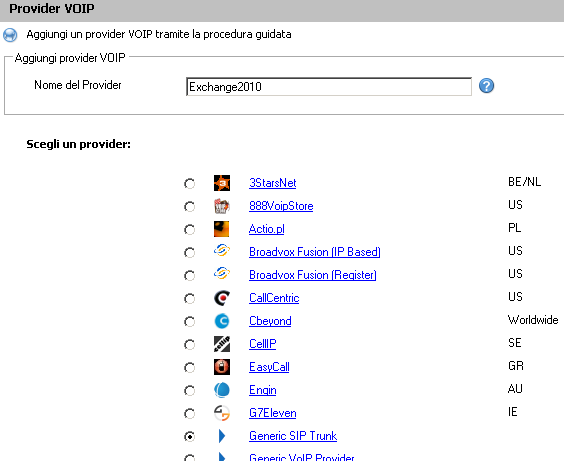
This article describes how to setup Microsoft Exchange 2007/2010 server as a Unified Messaging Server and configure 3CX Phone System to use it for voice mail and auto attendants This guide has been tested with the following components:Exchange 2007 SP1 RU8 and Exchange 2010 RTM 3CX Phone System version 8.0 and above 3CX Phone System must be installed on a separate machine. .
3CX CRM Integration overview 3CX Assistant includes a CRM Integration module to allow it to integrate with Microsoft Outlook or Salesforce.com When a call arrives to your extension, you will be notified about it with a screen pop-up containing the information of the contact that is calling you. In order to do this, the CRM integration module searches in Microsoft Outlook Contact folder or Salesforce Contact and Lead tables. If the callerid matches an entry in the CRM application database, the contact’s information will be shown in the screen pop-up
To uninstall any MSI installation that fails to uninstall itself for whatever reason, use the MSI Cleanup Utility: http://download.microsoft.com/download/e/9/d/e9d80355-7ab4-45b8-80e8-983a48d5e1bd/msicuu2.exe This version of Windows Installer CleanUp Utility works correctly in all 32-bit and 64-bit versions of Microsoft Windows. MSI cleanup utility The following will show how to clean up Ultidev Cassini when the standalone Cassini uninstaller fails. Download the file to the root for example c:/ and execute the msi installation from there.