


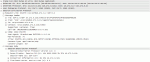
This article explains the main fields included in a SIP INVITE, which is sent to set-up a VoIP call. A SIP INVITE message contains typically between 4 and 6 header entries with contact information inside them
How to configure Secure SiP This is a complete guide that will provide detailed information on how to: 1. Setup 3CX Phone System with Secure SiP (TLS) (In this way the SiP messaging will be encrypted and therefore more secure) 2. Create certificates with Simple CA.

This article describes how to setup Microsoft Exchange 2007/2010 server as a Unified Messaging Server and configure 3CX Phone System to use it for voice mail and auto attendants This guide has been tested with the following components:Exchange 2007 SP1 RU8 and Exchange 2010 RTM 3CX Phone System version 8.0 and above 3CX Phone System must be installed on a separate machine. .

3CX CRM Integration overview 3CX Assistant includes a CRM Integration module to allow it to integrate with Microsoft Outlook or Salesforce.com When a call arrives to your extension, you will be notified about it with a screen pop-up containing the information of the contact that is calling you. In order to do this, the CRM integration module searches in Microsoft Outlook Contact folder or Salesforce Contact and Lead tables. If the callerid matches an entry in the CRM application database, the contact’s information will be shown in the screen pop-up

Many businesses who are adopting VoIP Software PBX Systems are always looking for a way to cut down costs. That’s where the Intel Atom N270 comes in the picture, which is designed to deliver performance with minimal power usage. In addition many of our partners have requested the ability to put together a low cost dedicated server based on an Intel Atom. The Intel Atom N270 can be found in many low cost servers and these can be used to create a low cost dedicated 3CX server. In this post we take a look at such a device, the Allnet FW8888 and run some bench mark tests against it to see how it performs
3CX administrators need to plan ahead on how to construct their 3CX Phone System. Now it is very time consuming to create 1 extension at a time for each user, with their settings and provisioning. There is a very simple way to achieve this – creating a .csv file and importing it.
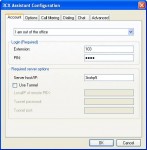
After high demand from 3CX administrators worldwide, we have finalized a version of the 3CX Assistant that is specifically designed for Windows Server OS with Terminal service roles enabled. This installation package is available for download from here . Things to note in the 3CX Assistant TS installation (V8.11138): The Assistant installation will not prompt you to choose whether to install CRM or the 3CX Phone.
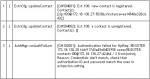
Introduction This article describes how an extension or a gateway line registers itself with the PBX Server to make itself available for making and receiving calls, and how the PBX Server will register itself with a VoIP Provider to make itself available for making and receiving calls. We trace through these steps by reading the server status log.
Although we recommend the use of supported VoIP Providers , in some cases it may be necessary to use an unsupported VoIP Provider. 3rd Party Supported VoIP Providers 3rd Party supported VoIP providers have been tested by the VoIP Provider or by 3CX and at the time of testing they we’re known to work
Introduction to the 3CX Media Server The 3CX Phone System’s main job is to connect 2 (or more) entities together for transmission of audio between them. However, there are 3 different mechanisms which can be utilized for the delivery of audio streams between 2 endpoints: Bypass Mode (Direct) Proxy Mode (Pass-Through) Transcoding Mode (Bound to Media Server) Audio streams are delivered by the 3CX Media Server.

 Copyright © 2025