


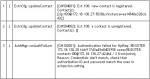
Introduction This article describes how an extension or a gateway line registers itself with the PBX Server to make itself available for making and receiving calls, and how the PBX Server will register itself with a VoIP Provider to make itself available for making and receiving calls. We trace through these steps by reading the server status log.
3CX partners with Avanzada 7 to bring windows based PBX to Iberia London, UK, February 09, 2010. 3CX ( www.3cx.com ), the international developer of the award-winning 3CX Phone System for Windows has announced a distribution agreement with Avanzada 7 ( www.avanzada7.com ), a leading value-added distributor of VoIP products in Spain and Portugal. Avanzada 7 distributes a complete range of VoIP hardware and software.
Although we recommend the use of supported VoIP Providers , in some cases it may be necessary to use an unsupported VoIP Provider. 3rd Party Supported VoIP Providers 3rd Party supported VoIP providers have been tested by the VoIP Provider or by 3CX and at the time of testing they we’re known to work
Introduction to the 3CX Media Server The 3CX Phone System’s main job is to connect 2 (or more) entities together for transmission of audio between them. However, there are 3 different mechanisms which can be utilized for the delivery of audio streams between 2 endpoints: Bypass Mode (Direct) Proxy Mode (Pass-Through) Transcoding Mode (Bound to Media Server) Audio streams are delivered by the 3CX Media Server.
Certified interoperability between 3CX’s popular PBX for Windows and Beronet’s Berofix VoIP gateways guarantees customers’ piece of mind. London, UK and Berlin, Germany – 1 February 2010 – 3CX – developer of the popular software PBX for Windows - 3CX Phone System , and Beronet – an industry leader in VoIP gateway equipment – announced today a strategic technology partnership that pairs 3CX’s software-based IP-PBX with Berofix VoIP gateways.
The CRM Plug In API is designed to allow customers & developers to easily integrate with CRM applications. Using this API you can do the following: Launch calls from your application Get notifications about the duration of ...
If the Media Server needs to allocate a port for media transmission, and cannot bind, it will generate a log message such as: MediaServerReporting:InitEndPoint [MS003003] C:179.1: RTCP socket 10.0.0.173:7023 binding failed with error code 10048 This is ...
This document describes how to fix and solve Internet Explorer Script Errors that come up in the 3CX Management Console every time one of the following actions is performed: Uploading an audio file to a Digital ...
This document describes how to resolve an issue when you try and access the 3CX Management Console or the 3CX MyPhone Portal and instead of getting the standard login screen, you see a blank white ...
When 3CX PhoneSystem needs to deliver email notifications, the SMTP mechanisms allowed can either be unauthenticated or authenticated using clear text. Some SMTP servers may be configured to allow only TLS or SSL exchange.

 Copyright © 2025